Bulin 47 AI Template: 23-Second Video From One Photo
Make the full, approximately 23-second Bulin 47 freestyle from one photo with original audio. Compare complete Standard and HD examples and choose your photo here.
Start with your photo
Preview your photo here, then confirm your settings in the studio.

1 · Your photo replaces this lead performer
2 · The foreground speaker holder stays
Full uses the 23.15-second reference excerpt loaded in this studio. The public Standard result runs for about 23.06 seconds.
One person, good light, face visible. JPG, PNG, WebP, HEIC or HEIF, up to 25 MB.
Full · ~23s
- Standard · 480p
- $9.99 USD
- HD · 720p
- $19.90 USD
USD · one-time payment · no subscription · Reference audio included
 Bulin47AI·Updated
One photo. Two complete results.
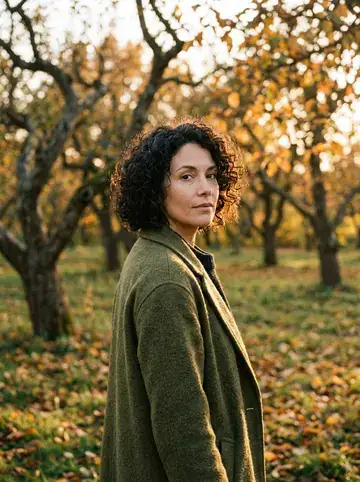
Use your photo for the lead performer behind the man carrying the speaker. The built-in Bulin 47 reference supplies the performance scene, crowd, movement and original audio. These are two separate generations from the same portrait.
The input photo
Full Standard · 480p
$9.99 USD
23.06 s · MP4
240 credits for one full video
Full HD · 720p
$19.90 USD
23.06 s · MP4
540 credits for one full video
See results from other photos
Sample files and original audio details
Both videos were generated separately from the same portrait and built-in reference. Download the actual files to compare the complete performance and sound.
Files checked by Bulin47AI ·
| Example | Length | Actual dimensions | Sound |
|---|---|---|---|
| Standard 480pDownload demo MP4 ↗ | 23.06 s | 486 × 844 | Original reference audio |
| HD 720pDownload demo MP4 ↗ | 23.06 s | 728 × 1264 | Original reference audio |
How the original audio was checked
Every audio packet in each example matches the corresponding beginning of the reference, including timing. The reference audio is trimmed to the generated video length; it is not a newly generated song.
This file check covers these two published examples. You can play and download both files.
File details, SHA-256 hashes and comparison results (JSON) ↗
On this page
What prompt do I need for the Bulin 47 AI video?
In Bulin47AI Studio, the editing instructions and freestyle reference are already built in. You only upload a clear photo and choose the length and quality; there is no prompt field or separate reference video to supply.
If you remember the freestyle performance with a speaker, a crowd and shoulder movements, that is the scene this template uses. Watch the actual photo-to-video result to check that it is the version you want before creating.
Which person does the template replace?
Your photo guides the lead performer behind the man carrying the black speaker. The foreground speaker holder, other people and setting stay part of the reference scene. Choose a clear photo of one person with the face and upper body visible.
Check the person and the excerpt
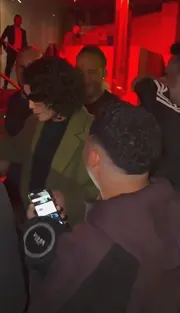
Compare three moments from the reference and Standard result
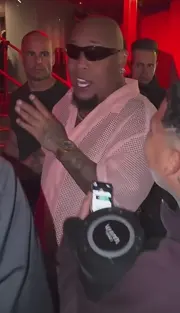 Reference
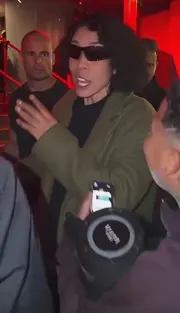 Standard result
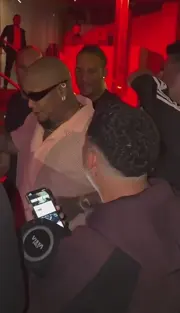 Reference
 Standard result
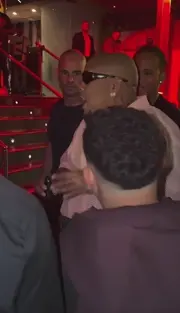 Reference
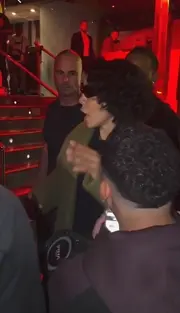 Standard result
Full performance or a short clip?
The full option uses the complete 23.15-second reference. The actual Standard and HD videos above are each approximately 23.06 seconds. Select Full in the studio to make this version, or choose 5, 10, 15 or 20 seconds for a shorter clip.
The examples above include the original audio. Play them with sound before choosing your quality. Each is a separate generation from the same input photo.
What the template supplies
The reference supplies the performance scene, the crowd, the camera movement and the performance. The full reference is 23.15 seconds long. It includes the original audio, so you can hear the performance when you unmute a completed clip.
You do not need to download a template file or find a separate editing preset. Open the studio, select a photo, then choose the duration and quality. For a closer look, watch the reference and generated result together.
Looking for the original freestyle and the person carrying the speaker? The original video and Kevin Wai guide links the creator posts and explains the AI version.
What your photo supplies
Your image is the visual reference for the lead performer's face, hair, body and clothing. Choose a clear single-person photo with the face and upper body visible. The photo guide explains the formats and framing.
The person is placed into the reference scene. The background of your photo is not the new video location. For example, the input portrait above was made in a wooded setting; both completed videos use the setting from the freestyle.
What you can choose
| Setting | Available choice |
|---|---|
| Person | Your uploaded photo |
| Length | 5, 10, 15, 20 seconds or the full performance |
| Quality | Standard 480p or HD 720p |
| Scene and audio | Built-in freestyle reference |
Use a short clip for an initial attempt or choose the full performance for the complete reference. The studio shows the credits for your chosen settings before you start.
Make your version
- Choose your photo on this page and preview it locally. Continue to the studio with the photo.
- Choose duration and quality.
- Sign in and add credits if needed.
- Return to the studio and press Create.
- Play the result with sound and download the MP4.
The step-by-step creation guide covers account setup, current packs and downloading. To compare detail before choosing quality, see the Standard and HD examples.
Comparing this with an editor preset? See Bulin 47 CapCut template vs AI video.
Common questions
Which person does my photo replace?
Your photo guides the lead performer behind the foreground man carrying the black speaker. The template keeps the speaker holder and the other people in the reference scene.
Do I need a prompt or a template download?
No. The Bulin 47 performance and editing instructions are already loaded in the studio. Upload one photo, choose the duration and quality, then create your video.
Does the finished video include the original audio?
Yes. The downloaded MP4 includes the matching original reference audio. Play either complete example on this page with sound to listen.
Can I create the full performance instead of a short clip?
Yes. Choose Full to use the complete 23.15-second reference. The two public results on this page are approximately 23.06 seconds long. You can also choose 5, 10, 15 or 20 seconds.
Is this template free to use?
You can watch the examples without paying or signing in. Creating your own video uses purchased credits from a one-time pack; no subscription is required.
How long is my finished video saved?
Newly generated videos are saved privately for 7 days after completion. Sign in to watch or download them, and save a local copy within that period.
Will I receive an email when my video is ready?
Yes. Completion and confirmed failure notices for new generations go to your verified account email. You can leave the page and return to the studio from the email.